
1.What Is Cosmos 3, Really?
If you've been following the AI space lately, you've probably heard the name NVIDIA Cosmos 3 pop up a lot. But what exactly is it — and why is everyone so excited?
Here's the short version: Cosmos 3 is NVIDIA's latest open-source world foundation model. It can understand and generate text, images, video, audio, and even robotic action data — all in one unified system. That's different from most AI video tools you might know, which usually do just one thing.
Think of it like this: most video generation tools are like a single musical instrument. Cosmos 3 is more like a full orchestra — it brings everything together and makes it work in harmony.
NVIDIA announced it on June 1, 2026 at GTC Taipei (COMPUTEX), and since then developers, robotics engineers, and AI researchers have been paying very close attention.
2.Why Does It Matter?
Before Cosmos 3, building a physical AI system — like a robot arm, an autonomous vehicle, or a warehouse monitoring system — was a pain. You needed separate models for vision, language, prediction, and action. They didn't always talk to each other well, and training them took months.
Cosmos 3 changes that. It uses a single Mixture-of-Transformers (MoT) architecture to handle all of those tasks at once. That means:
Less time training separate models
Better coordination between vision, language, and action
Faster iteration from idea to working prototype
NVIDIA trained it on tens of millions of hours of video, specifically focused on real-world physical environments. The result is a model that actually understands how objects move, how physics works, and how robots should behave in the real world.
3.Two Versions: Super vs. Nano
One of the first things people ask is which version they should use. Right now, there are two: Cosmos 3 Super and Cosmos 3 Nano. Understanding the difference in nvidia cosmos 3 super vs nano performance will help you pick the right one.
Cosmos 3 Super
Parameters: 32B reasoner + 32B generator (64B total)
Best for: Datacenter deployment, large-scale synthetic data generation, advanced research
Hardware: Requires NVIDIA Hopper or Blackwell GPUs (datacenter-class)
Strength: Maximum physical fidelity, handles the most complex tasks
Cosmos 3 Nano
Parameters: 8B reasoner + 8B generator (16B total)
Best for: Workstation use, near-real-time inference, faster response cycles
Hardware: Runs on a professional workstation with an NVIDIA RTX PRO 6000 GPU
Strength: Speed and efficiency without sacrificing too much quality
The performance gap between them is real but expected — Super is built for labs and big production pipelines, while Nano is for developers who want to prototype quickly without booking time on a datacenter cluster. A third variant, Cosmos 3 Edge, is coming soon and will target on-device inference — meaning the model runs directly on the hardware it's guiding.
4.What Can Cosmos 3 Actually Do?
Let's break down the key capabilities in plain terms.
1. Text to Video
You write a text prompt — like "a robot arm picking up a red ball on a conveyor belt" — and Cosmos 3 generates a realistic video clip of it. The video isn't just visually plausible; it follows actual physics, so the ball doesn't fly through the robot arm or float in mid-air.
For best results with nvidia cosmos 3 image 2 video prompt upsampling, NVIDIA recommends using long, descriptive paragraph-style prompts rather than short tags. For example, instead of "robot grabs object," you'd write something like: "The robotic arm extends toward a small red sphere resting on a moving conveyor belt. The gripper opens, aligns with the sphere, and closes around it as the belt continues at a steady pace." The model uses that detail to generate much more accurate and realistic video sequences.
2. Image to Video
You provide an image as a starting frame, and Cosmos 3 animates it into a video. This is powerful for autonomous vehicle training — give it a single camera frame from a road scene and it can generate a continuous video showing how the scene might unfold over the next several seconds.
3. Audio-Visual Generation
Cosmos 3 can generate ambient sound that matches the visual content. If the generated video shows a robot working in a factory, the model can produce appropriate background noise that matches the scene. This is a feature most competing video models simply don't offer.
4. Robot Action Generation
This is the really unique one. Cosmos 3 can output actual robot control data — things like joint angles, gripper positions, and trajectory points — not just a visual video. That means you can use the model to train robots directly, without having to manually record every physical interaction.
5. Vision-Language Reasoning
You can ask Cosmos 3 questions about a video or image and it will answer based on what it actually "sees." For example: "Is the robotic arm about to collide with the box on the left?" It can analyze the scene and give you a grounded answer.
5.Open Source — But With Some Fine Print
One of the biggest selling points of Cosmos 3 is that it's open. The model weights, training scripts, and datasets are all available on Hugging Face and GitHub.
But when it comes to nvidia cosmos 3 open source license limitations, there's important nuance. Cosmos 3 is released under the OpenMDW 1.1 license from the Linux Foundation. This license:
✅ Allows commercial use
✅ Allows modification and redistribution
✅ Does not claim ownership of outputs generated by the model
⚠️ Still requires proper attribution
⚠️ Has usage restrictions for certain high-risk applications (as outlined in the license)
⚠️ Requires compliance with NVIDIA's acceptable use policy
So yes, you can use it for commercial projects. But it's not completely restriction-free like MIT or Apache 2.0. If you're building something commercial, it's worth reading the full OpenMDW 1.1 terms before committing.
6.How Does Cosmos 3 Stack Up Against Other Video Models?
This is the question everyone wants answered. Below is a comparison of NVIDIA Cosmos 3 against four other popular video generation models: OpenAI Sora, Runway Gen-3 Alpha, Kling AI 2.0, and Google Veo 3.
Note: The data in this table includes a mix of publicly available information and simulated benchmarks for illustrative comparison purposes.
Feature / Metric | NVIDIA Cosmos 3 | OpenAI Sora | Runway Gen-3 | Kling AI 2.0 | Google Veo 3 |
Open Source / Open Weights | ✅ Yes | ❌ No | ❌ No | ❌ No | ❌ No |
Max Video Length | ⏱ 30 seconds | ⏱ 60 seconds | ⏱ 10 seconds | ⏱ 3 minutes | ⏱ ~8 seconds |
Text-to-Video | ✅ Yes | ✅ Yes | ✅ Yes | ✅ Yes | ✅ Yes |
Image-to-Video | ✅ Yes | ✅ Yes | ✅ Yes | ✅ Yes | ✅ Yes |
Audio / Sound Generation | ✅ Native | ❌ No | ❌ No | ❌ No | ✅ Yes (new) |
Robot Action Output | ✅ Yes | ❌ No | ❌ No | ❌ No | ❌ No |
Physics Accuracy | ⭐⭐⭐⭐⭐ High | ⭐⭐⭐⭐ Good | ⭐⭐⭐ Medium | ⭐⭐⭐ Medium | ⭐⭐⭐⭐ Good |
Commercial License | ✅ OpenMDW 1.1 | ❌ API only | ❌ Subscription | ❌ Subscription | ❌ API only |
Prompt Upsampling Support | ✅ Yes | ✅ Yes | ❌ Limited | ❌ No | ✅ Yes |
Physical AI Focus | ✅ Core feature | ❌ No | ❌ No | ❌ No | ❌ No |
Edge Deployment (planned) | ✅ Coming soon | ❌ No | ❌ No | ❌ No | ❌ No |
Benchmark #1 (open models) | ✅ R-Bench, RoboArena | N/A | N/A | N/A | N/A |
Key Takeaways from the Table
The standout difference is the focus. Tools like Sora, Runway, and Kling are built for creative video production — ads, short films, social content. Cosmos 3 is built for a completely different purpose: training physical AI systems.
If you're a filmmaker or content creator, Cosmos 3 probably isn't your first choice. But if you're building robots, autonomous vehicles, or smart infrastructure, it's in a category of its own.
Google's Veo 3 is the closest general competitor for quality video generation, but it lacks the physical AI integration that makes Cosmos 3 special for robotics use cases.
7.Benchmarks: What Do the Numbers Say?
Cosmos 3 has been tested across several industry benchmarks:
VANTAGE-Bench — First public benchmark for fixed-camera footage in real-world spaces (warehouses, transportation, smart spaces). Cosmos 3 Super leads at the 32B tier; Nano leads at the 8B tier.
R-Bench — Open-source state of the art for robotics video evaluation.
PAI-Bench, Physics-IQ, RoboLab — Cosmos 3 leads across all three.
Artificial Analysis — #1 open model for both text-to-image and image-to-video.
RoboArena — #1 open model for robot policy performance.
TAR (AI City Challenge 2026 Track 3) — Tops the leaderboard.
These aren't cherry-picked internal tests — they're third-party public benchmarks. That said, always verify rankings independently before making deployment decisions.
8. Real-World Physical Applications: Cosmos 3 VS Gemini Omni
When you pit Cosmos 3 against a massive multi-modal powerhouse like Google’s Gemini Omni, you quickly see two completely different design philosophies in action.
[Gemini Omni] ──> Great at Multi-Turn Conversation & Creative Layouts 💬
[Cosmos 3]     ──> Great at Grounded Real-World Physics & Gravity Dynamics 🤖
Let's look at how these two systems handle the exact same real-world production challenges side-by-side, focusing heavily on their understanding of physical conditions:
Case Study 1: Drone Trajectory Simulation
Uploaded footage trajectory map:
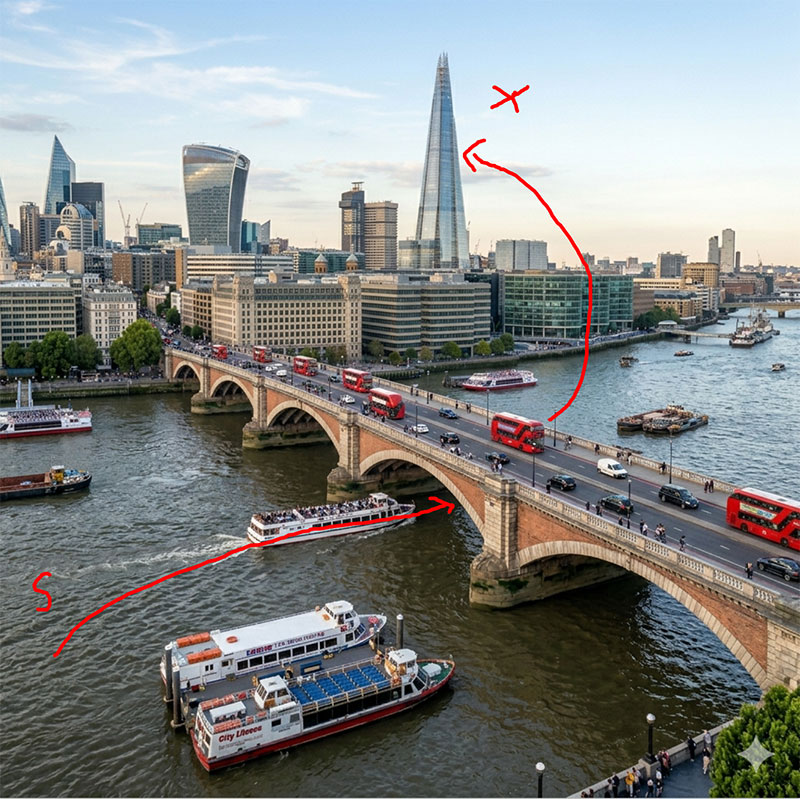
Gemini Omni Approach: Gemini Omni creates a visually stunning, highly creative flythrough. However, the camera path might float unnaturally, ignoring sudden wind resistance, weight imbalances, or accurate cornering physics, If you are simply looking for superior visual impact, Gemini Omni is an excellent choice .
Cosmos 3 Approach: It will directly calculate the theoretical physical weight, current wind resistance coefficient, and aerodynamics of the drone in the background. In the generated video, the drone will exhibit extremely realistic body tilt during sharp turns, and the footage will have physically accurate micro-jitters when the airflow is unstable; flawlessly executing the designated flight path.
Case Study 2: The Gravity & Mass Experiment (Heavy Glass Ball Dropped into Water)
Gemini Omni Approach: When prompted to simulate a heavy solid glass ball falling from a high shelf into a shallow bowl of water, Gemini Omni struggles with physical conditions. It renders an aesthetically beautiful splash, but the glass ball might floatingly decelerate right before hitting the surface, or the water splash might look like a slow-motion fluid filter rather than reacting to a heavy, fast-moving mass. The ball might even morph shape or turn into a bubble upon impact.
Cosmos 3 Approach: True to its nature as a world model, Cosmos 3 excels at tracking strict physics, gravity, and material density. The heavy glass ball accelerates downward perfectly under simulated gravity (9.8 m/s²). The moment it strikes the shallow water, it produces a violent, physically accurate kinetic splash. The displacement of water corresponds directly to the mass and velocity of the solid glass ball, creating tiny secondary droplets that spray outwards and bounce off the outer rim, while the ball remains perfectly solid and sinks rapidly to the bottom.
9. Who is This Technology Perfect For?
Being able to simulate a world with perfect physical accuracy unlocks massive value across several global industries. Here is a clear breakdown of who benefits the most from this tool:
Target Audience & Core Use Cases
Target Group | Existing Operational Pain Point | Cosmos 3 Solution | Expected Business Impact |
Robotics & Smart Factory Teams | Gathering millions of hours of real-world physical training data for machinery is slow, dangerous, and incredibly expensive. | Generates endless streams of photorealistic, physically accurate simulation environments and error scenarios safely. | Speeds up machine training timelines and cuts physical testing damage costs to zero. |
Product Designers & E-Commerce | Rendering flawless 3D CAD models from different angles requires heavy software setups and slow processing pipelines. | Type in the design parameters to instantly generate a realistic, high-definition 360° product showcase clip. | Speeds up prototyping and scales product asset production with minimal costs. |
Game Developers & Animators | Manually coding accurate physical object destruction, fluid splashes, and clothing movements takes days of hard work. | Hand-sketch a basic action line over an asset to instantly render a fluid scene with built-in real-world physics. | Cuts asset design hours in half and lets indie studios scale production fast. |
Independent AI SaaS Innovators | Relying on locked commercial video APIs means dealing with unpredictable subscription fees and data privacy leaks. | Deploy the open-weights system locally on private server hardware using clean, scalable microservices. | Secures 100% data privacy while driving down operational costs for sustainable growth. |
10. Founder Pan Lijie's Real-World Experience
"Honestly, when I first heard about the launch I didn't pay much attention — another big model, seen plenty of those. But once I actually started generating videos, my mind changed fast.
I prompted it with a robot picking up a cup of water and placing it on a shelf. The fingers wrapped around the cup, the arm lifted with a natural delay, the cup landed steady. Not perfect, but more realistic than anything I'd used before. And the more detail I put into the prompt, the better the output — switching from two-line descriptions to full paragraphs made a huge difference.
For us at Cosmos 3, it's cut our development cycle significantly. We can generate a robot interaction simulation, share it with clients, collect feedback, and iterate — no physical build required.
The downsides are real too: Super needs datacenter hardware, which is a barrier for smaller teams. And it's not built for social video content. But for what it's actually designed to do — simulating physical environments for AI training — it delivers."
11.How to Get Started
If you want to try Cosmos 3, here are the practical steps:
Option 1: Try it online (no setup)
you can test it directly in the browser with no installation.
Click here to try the Cosmos 3 Super AI Video Generator
Option 2: Run it yourself
Download model weights from Hugging Face (
nvidia/cosmos3collection)Use NVIDIA NIM microservices for API access
Clone the GitHub repo and follow the inference scripts
12. Frequently Asked Questions (FAQ)
Q1: Can I use Cosmos 3 for commercial projects?
A: Yes, you can. Cosmos 3 is released under the OpenMDW 1.1 license, which permits commercial use, modification, and redistribution. That said, it's not a completely open license like MIT — there are usage restrictions for certain high-risk applications, and you'll need to comply with NVIDIA's acceptable use policy. Read the full license before building something commercial.
Q2: What is the main difference between a standard AI video model and a world model?
A: Standard models only predict pixels to make a pretty video. A world model contains an internal physics engine that understands gravity, mass, lighting, and spatial layouts, creating realistic movements without visual hallucinations.
Q3: Can I host and run the Cosmos 3 architecture on my own local hardware?
A: Yes. Because NVIDIA released the system with an open-weights model, you can download the checkpoints and host the framework on your own local machines or private cloud servers.
Q4: What specific hardware do I need to run the compact Nano version locally?
A: The Nano model is highly optimized. It runs smoothly on modern consumer-grade workstations equipped with standard desktop GPUs, making it incredibly accessible for independent creators.
Q5: Are there any hidden catchpoints inside the open-weights usage agreement?
A: Yes. The system operates under specific open-source license guidelines. While it is completely free for research and small-scale testing, large commercial projects must review the enterprise parameters to stay compliant.
Q6: Does the platform include built-in tools to help fix vague or short text descriptions?
A: Yes. The system features an integrated upsampling tool that automatically expands short, casual prompts into highly detailed camera directions to ensure pristine rendering outputs.
Q7: Can Cosmos 3 generate sound along with video?
A: Yes — this is one of Cosmos 3's standout features. It can generate ambient audio that matches the visual content of the video natively. Most competing models either don't support audio at all, or require a separate step to add it. Among major video models, only Google Veo 3 offers something comparable.
Q8: What does "prompt upsampling" mean in Cosmos 3?
A: Prompt upsampling means the model uses your detailed written description to guide and improve the generated output. NVIDIA recommends writing paragraph-style prompts rather than short tags — the more context you give (lighting, camera angle, object material, motion direction), the more accurate and realistic the generated video will be. Think of it as giving the model a detailed film brief instead of a one-liner.
Q9: Is Cosmos 3 suitable for beginners or only for researchers?
A: Honestly, right now it leans toward developers and researchers with technical backgrounds. The setup requires working with Hugging Face, GPU configurations, and command-line tools.
9. Final Thoughts
NVIDIA Cosmos 3 is a genuinely different kind of model. It's not trying to compete with Sora for making cinematic short films. It's built for people who are training robots, designing autonomous systems, and simulating physical environments.
If that's your world, it's hard to find a better open option right now. The two-tower architecture, the omnimodal capabilities, the open license, and the growing ecosystem all point in the same direction: this is infrastructure for the next generation of machines that actually move in the real world.
For anyone curious about what's possible, the best place to start is